


First step : check that the raspberry pi provide serial outputs as expected :
To activate this in hardware config activate " WRITEUSERDEVICE " .

Nothing more is needed for this first step.
By default Raspberry serial0 is selected, this is connected to GPIO 14 (TX ) and GPIO 15 (RX )
And default baudrate is 115200 Baud.
You should check that the data is available on the TX pin ( GPIO 14 ) with an oscilloscop or just a led.
Note refer to this to double check that you are using the correct raspberry pi GPIO :
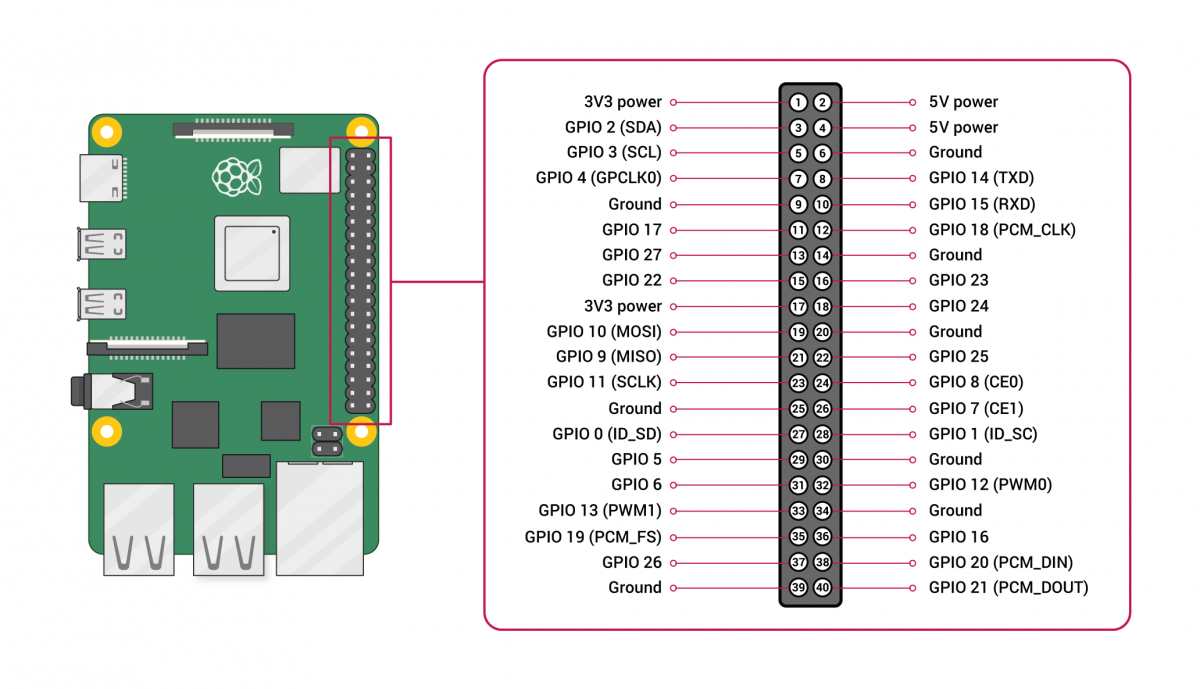
You can also use simple this arduino sketch:
// Connect RX arduino pin digital 0   to Raspberry Pi Tx Pi Gpio 14
// Connect Arduino GND and Raspberry Pi GND
// Either connect Arduino 5V to Raspberry pi 5V or connect Arduino USB on your computeur.
// If some data is received, the led will be on and text will be display on Serial monitor if arduino is connected with USB
// If no data the led will stay off.

#define LED 13

void setup() {
  // put your setup code here, to run once:
  Serial.begin(115200);
  pinMode(LED, OUTPUT);
}

void loop() {
  // put your main code here, to run repeatedly:
  if (Serial.available()) {  // Data received
    digitalWrite(LED, HIGH);
    int incomingByte = Serial.read();
    Serial.print("I received: ");  // Display received data
    Serial.println(incomingByte, DEC);

  } else {
    digitalWrite(LED, LOW);
  }

}