
could it be possible to solve this problem by using 2 separate usb chargers at the same time?
they HAVE to be separate isolated outputs. NOT from a single charger.
could that work @Mike118 ?
one plugged into the pi the other into the UPS.

1792 réponses à ce sujet
#102

Yannovsky
-

- Membres
- 96 messages
Membre
Posté 10 mai 2020 - 08:31
Hello ! One missing function: "Power Switch" or some kind of momentary "Reboot Switch". Now the new UPS is "always on" type. Once you plug the batterie, it is starting to power the Pi and Pi start directly. If you power off the Pi using correpsonding vigibot button or ssh command, you are not able to reboot the system without unplug the batterie.
Because plug/unplug batterie is not always easy. During the assembly process or once it is finished, it can be a tricky issue. Assembly the robot with a power on Pi is not a really good idea too.
Because plug/unplug batterie is not always easy. During the assembly process or once it is finished, it can be a tricky issue. Assembly the robot with a power on Pi is not a really good idea too.
#105
Mike118
-
- Administrateur
-

- 12 871 messages
Staff Robot Maker
- Gender:Male
- Location:Anglet
- Interests:Robotique, Entrepreneuriat, Innovation, Programmation, Résolution de problème, Recherche de solutions, Mécanique, Electronique, Créer, Concevoir
Posté 10 mai 2020 - 15:35
We need to find a solution for this ...
I note that people want a switch on their robots, and that the robot can boot up alone if put back on the charging station. This should be possible but may be tricky... This is what was not working well on the red UPS board ...
I note that people want a switch on their robots, and that the robot can boot up alone if put back on the charging station. This should be possible but may be tricky... This is what was not working well on the red UPS board ...
Si mon commentaire vous a plus laissez nous un avis ! 
Nouveau sur Robot Maker ?
Jetez un oeil aux blogs, aux tutoriels, aux ouvrages, au robotscope aux articles, à la boutique et aux différents services disponible !
En attendant qu'une bibliothèque de fichiers 3D soit mise en place n'hésitez pas à demander si vous avez besoin du fichier 3D d'un des produits de la boutique... On l'a peut être !
Si vous souhaitez un robot pilotable par internet n'hésitez pas à visiter www.vigibot.com et à lire le sous forum dédié à vigibot!
#107
firened
-

- Membres
-
- 2 124 messages
Pilier du forum
- Gender:Male
Posté 10 mai 2020 - 16:02
i couldn't find a holder with switch. but there are external JR plug switches. like this
https://a.aliexpress.com/_B0HpN6
https://a.aliexpress.com/_B0HpN6
#109
Mike118
-
- Administrateur
-
- 12 871 messages
Staff Robot Maker
- Gender:Male
- Location:Anglet
- Interests:Robotique, Entrepreneuriat, Innovation, Programmation, Résolution de problème, Recherche de solutions, Mécanique, Electronique, Créer, Concevoir
Posté 10 mai 2020 - 16:06
@fire_ned This product solve the " I want to switch off the robot  But it don't allow the " My robot have run out of battery problems "
A good solution is to use a switch like this when you want switch off your robot and prevent your robot from running out off batteries x)
But it don't allow the " My robot have run out of battery problems "A good solution is to use a switch like this when you want switch off your robot and prevent your robot from running out off batteries x)
Si mon commentaire vous a plus laissez nous un avis !
Nouveau sur Robot Maker ?
Jetez un oeil aux blogs, aux tutoriels, aux ouvrages, au robotscope aux articles, à la boutique et aux différents services disponible !
En attendant qu'une bibliothèque de fichiers 3D soit mise en place n'hésitez pas à demander si vous avez besoin du fichier 3D d'un des produits de la boutique... On l'a peut être !
Si vous souhaitez un robot pilotable par internet n'hésitez pas à visiter www.vigibot.com et à lire le sous forum dédié à vigibot!
#110
Yannovsky
-
- Membres
- 96 messages
Membre
Posté 10 mai 2020 - 16:08
Thanks Firened. I'll use more simple solution. A simple as possible Male/Femalle short link. https://www.flashrc....mm_dualsky.html
This is more easy to integrate and I don't have to care about current rate
and if I need to connect the batterie directly to power supply (without UPS) for BMS wake-up it will be very easy without any intervention on the robot
@Mike118 I already meet this problem with red UPS. When my batterie was totaly drain, BMS cut off. I was unable to charge on the red UPS. Do you ever seen this before ?
This is more easy to integrate and I don't have to care about current rate
and if I need to connect the batterie directly to power supply (without UPS) for BMS wake-up it will be very easy without any intervention on the robot
@Mike118 I already meet this problem with red UPS. When my batterie was totaly drain, BMS cut off. I was unable to charge on the red UPS. Do you ever seen this before ?
#111
Mike118
-
- Administrateur
-
- 12 871 messages
Staff Robot Maker
- Gender:Male
- Location:Anglet
- Interests:Robotique, Entrepreneuriat, Innovation, Programmation, Résolution de problème, Recherche de solutions, Mécanique, Electronique, Créer, Concevoir
Posté 10 mai 2020 - 16:18
Do you have a modified red UPS or a standard one ?
Si mon commentaire vous a plus laissez nous un avis !
Nouveau sur Robot Maker ?
Jetez un oeil aux blogs, aux tutoriels, aux ouvrages, au robotscope aux articles, à la boutique et aux différents services disponible !
En attendant qu'une bibliothèque de fichiers 3D soit mise en place n'hésitez pas à demander si vous avez besoin du fichier 3D d'un des produits de la boutique... On l'a peut être !
Si vous souhaitez un robot pilotable par internet n'hésitez pas à visiter www.vigibot.com et à lire le sous forum dédié à vigibot!
#113
Mike118
-
- Administrateur
-
- 12 871 messages
Staff Robot Maker
- Gender:Male
- Location:Anglet
- Interests:Robotique, Entrepreneuriat, Innovation, Programmation, Résolution de problème, Recherche de solutions, Mécanique, Electronique, Créer, Concevoir
Posté 10 mai 2020 - 16:22
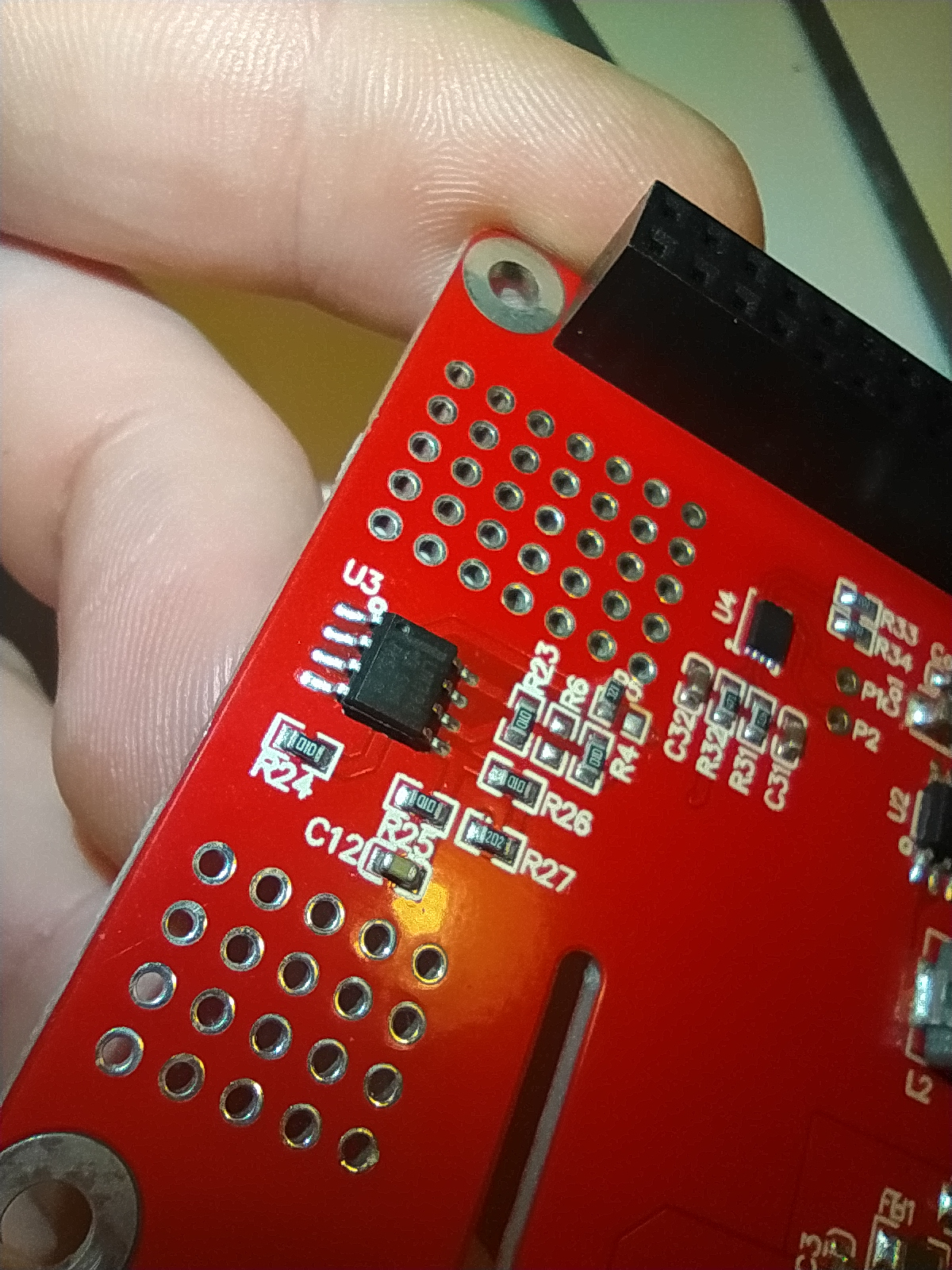
Do you have U3 on your UPS ?
Si mon commentaire vous a plus laissez nous un avis !
Nouveau sur Robot Maker ?
Jetez un oeil aux blogs, aux tutoriels, aux ouvrages, au robotscope aux articles, à la boutique et aux différents services disponible !
En attendant qu'une bibliothèque de fichiers 3D soit mise en place n'hésitez pas à demander si vous avez besoin du fichier 3D d'un des produits de la boutique... On l'a peut être !
Si vous souhaitez un robot pilotable par internet n'hésitez pas à visiter www.vigibot.com et à lire le sous forum dédié à vigibot!
#115
Mike118
-
- Administrateur
-
- 12 871 messages
Staff Robot Maker
- Gender:Male
- Location:Anglet
- Interests:Robotique, Entrepreneuriat, Innovation, Programmation, Résolution de problème, Recherche de solutions, Mécanique, Electronique, Créer, Concevoir
Posté 10 mai 2020 - 16:26
ok ok, just to be sure that you have a standard one.
When you removed R5 did you make a short somewhere ?
You should at least remove R5 and then put some solder between C14 and C11 which are below U2, and this short should be done near the inductance ( the big grey square )
When you removed R5 did you make a short somewhere ?
You should at least remove R5 and then put some solder between C14 and C11 which are below U2, and this short should be done near the inductance ( the big grey square )
Si mon commentaire vous a plus laissez nous un avis !
Nouveau sur Robot Maker ?
Jetez un oeil aux blogs, aux tutoriels, aux ouvrages, au robotscope aux articles, à la boutique et aux différents services disponible !
En attendant qu'une bibliothèque de fichiers 3D soit mise en place n'hésitez pas à demander si vous avez besoin du fichier 3D d'un des produits de la boutique... On l'a peut être !
Si vous souhaitez un robot pilotable par internet n'hésitez pas à visiter www.vigibot.com et à lire le sous forum dédié à vigibot!
#117
Mike118
-
- Administrateur
-
- 12 871 messages
Staff Robot Maker
- Gender:Male
- Location:Anglet
- Interests:Robotique, Entrepreneuriat, Innovation, Programmation, Résolution de problème, Recherche de solutions, Mécanique, Electronique, Créer, Concevoir
Posté 10 mai 2020 - 16:37
Just to explain you " why " we make the short => R5 connect U3 with U2.
C14 is connected on U2
with the short you replace the impact that U3 was having on U2 with a " force allways on " order.
C14 is connected on U2
with the short you replace the impact that U3 was having on U2 with a " force allways on " order.
Si mon commentaire vous a plus laissez nous un avis !
Nouveau sur Robot Maker ?
Jetez un oeil aux blogs, aux tutoriels, aux ouvrages, au robotscope aux articles, à la boutique et aux différents services disponible !
En attendant qu'une bibliothèque de fichiers 3D soit mise en place n'hésitez pas à demander si vous avez besoin du fichier 3D d'un des produits de la boutique... On l'a peut être !
Si vous souhaitez un robot pilotable par internet n'hésitez pas à visiter www.vigibot.com et à lire le sous forum dédié à vigibot!
#119
Mike118
-
- Administrateur
-
- 12 871 messages
Staff Robot Maker
- Gender:Male
- Location:Anglet
- Interests:Robotique, Entrepreneuriat, Innovation, Programmation, Résolution de problème, Recherche de solutions, Mécanique, Electronique, Créer, Concevoir
Posté 10 mai 2020 - 17:31
One of the component is the CW2015
this is the fuel gauge batterie. I made this fuel gauge with the exact same component : https://www.robot-ma...rie-i2c-1s.html
the 2 other components are a charge IC and and a step up IC, but I choose better ones for our UPS board
https://www.aliexpre...3032500223.html this is the charger
this is the fuel gauge batterie. I made this fuel gauge with the exact same component : https://www.robot-ma...rie-i2c-1s.html
the 2 other components are a charge IC and and a step up IC, but I choose better ones for our UPS board
https://www.aliexpre...3032500223.html this is the charger
Si mon commentaire vous a plus laissez nous un avis !
Nouveau sur Robot Maker ?
Jetez un oeil aux blogs, aux tutoriels, aux ouvrages, au robotscope aux articles, à la boutique et aux différents services disponible !
En attendant qu'une bibliothèque de fichiers 3D soit mise en place n'hésitez pas à demander si vous avez besoin du fichier 3D d'un des produits de la boutique... On l'a peut être !
Si vous souhaitez un robot pilotable par internet n'hésitez pas à visiter www.vigibot.com et à lire le sous forum dédié à vigibot!
#120
firened
-
- Membres
-
- 2 124 messages
Pilier du forum
- Gender:Male
Posté 14 mai 2020 - 09:35
oh yeah ops, we talked in the wrong group.
those are good documentations you sent mike
1.1- the proposed switch is an effective solution to problem 1 when the charger enters trickle charge to wake up the cells.
1.2- maybe it would be possible to disable the trickle charge mode on the charger module. since all cells must have a BMS (usually with a cutoff voltage of 2.4V - 3.0V), a slow wake up trickle charge is not really necessary.
1.3- use a BMS with a cutoff of 3.1V or more. (i found some with a 3.0V cutoff, but higher is hard to find, maybe a manufacturer can change it easily?)
1.4- a custom low voltage cutoff in front of the step up. (not very practical)
1.5- a 30min turn-on delay switch in front of the step up. (not very practical)
1.6- maybe the step up has a cutoff voltage too that could be changed? specs say "With voltage indicator (LED indicator off when input voltage less than 2.7V)"
but it doesn't say whether it's just the led or the whole step up that turns off below 2.7V.
those are good documentations you sent mike
1.1- the proposed switch is an effective solution to problem 1 when the charger enters trickle charge to wake up the cells.
1.2- maybe it would be possible to disable the trickle charge mode on the charger module. since all cells must have a BMS (usually with a cutoff voltage of 2.4V - 3.0V), a slow wake up trickle charge is not really necessary.
1.3- use a BMS with a cutoff of 3.1V or more. (i found some with a 3.0V cutoff, but higher is hard to find, maybe a manufacturer can change it easily?)
1.4- a custom low voltage cutoff in front of the step up. (not very practical)
1.5- a 30min turn-on delay switch in front of the step up. (not very practical)
1.6- maybe the step up has a cutoff voltage too that could be changed? specs say "With voltage indicator (LED indicator off when input voltage less than 2.7V)"
but it doesn't say whether it's just the led or the whole step up that turns off below 2.7V.
Répondre à ce sujet


1 utilisateur(s) li(sen)t ce sujet
0 members, 1 guests, 0 anonymous users

