

I got the charging problem only once, never drain the battery off second time, so I'm unable to confirm the issue yet. But I think the problem was more due to BMS issue. I'll try to do some tests later. Already disconnected the charger from my robot.

1792 réponses à ce sujet
#122

Serveurperso
-

- Membres
-

- 5 097 messages
Pilier du forum
- Gender:Male
- Location:Paris
- Interests:Systèmes/Réseaux/Dev/Hardware/RF/Optique/Lasers...
Posté 14 mai 2020 - 10:47
sur la PI t'as un jumper qui l'empêche de démarrer et la bloque en consolation de quelques milliamperes. c'est mieux qu'un interrupteurs général bouïné
Make your own raspberry robot, control it over the internet in FPV mode with super low latency and securely share access on it to your friends with Vigibot.com! You are welcome to test our robots now!
https://www.vigibot.com(100% free, no ads)
#124
Mike118
-
- Administrateur
-
- 12 871 messages
Staff Robot Maker
- Gender:Male
- Location:Anglet
- Interests:Robotique, Entrepreneuriat, Innovation, Programmation, Résolution de problème, Recherche de solutions, Mécanique, Electronique, Créer, Concevoir
Posté 14 mai 2020 - 12:48
In any case, the switch is something that have been asked by three people now... Yes we made it to be H24 switch on ... But some people want to be able to easily switch it off ... So if it can solve both thing at the same time, adding a switch is not a bad solution... But I am still open to any other practical suggestion =).
Si mon commentaire vous a plus laissez nous un avis ! 
Nouveau sur Robot Maker ?
Jetez un oeil aux blogs, aux tutoriels, aux ouvrages, au robotscope aux articles, à la boutique et aux différents services disponible !
En attendant qu'une bibliothèque de fichiers 3D soit mise en place n'hésitez pas à demander si vous avez besoin du fichier 3D d'un des produits de la boutique... On l'a peut être !
Si vous souhaitez un robot pilotable par internet n'hésitez pas à visiter www.vigibot.com et à lire le sous forum dédié à vigibot!
#125
firened
-

- Membres
-
- 2 124 messages
Pilier du forum
- Gender:Male
Posté 14 mai 2020 - 13:59
it's pretty hard to find information on it..
the PEN or RUN pin could be used to achieve the same as the switch. to keep a pi shut off (except some mA), and to get it out of a discharged state.
raspberry pi 2 B+ and newer have a RUN pin.
raspberry pi 3 B+ and newer have RUN and PEN.
I don't know whether the PEN or RUN pin uses less power..
they are both pulled high. if we connect a switch from one of those pins to GND it will disable the pi.
all in all, cutting a trace on the UPS would not be necessary this way, but it still uses a tiny bit of power (6Ah charge last 24 days @ 10mA).
and it's still a manual solution for when the battery is empty.
the PEN or RUN pin could be used to achieve the same as the switch. to keep a pi shut off (except some mA), and to get it out of a discharged state.
raspberry pi 2 B+ and newer have a RUN pin.
raspberry pi 3 B+ and newer have RUN and PEN.
I don't know whether the PEN or RUN pin uses less power..
they are both pulled high. if we connect a switch from one of those pins to GND it will disable the pi.
all in all, cutting a trace on the UPS would not be necessary this way, but it still uses a tiny bit of power (6Ah charge last 24 days @ 10mA).
and it's still a manual solution for when the battery is empty.
#126
Serveurperso
-
- Membres
-
- 5 097 messages
Pilier du forum
- Gender:Male
- Location:Paris
- Interests:Systèmes/Réseaux/Dev/Hardware/RF/Optique/Lasers...
Posté 14 mai 2020 - 14:01
RUN is a processor reset pin (processor disable)
PEN is general power disable
RUN and PEN are pull-up to VCC
RUN GND = 100mA
PEN GND = 10mA
PEN is general power disable
RUN and PEN are pull-up to VCC
RUN GND = 100mA
PEN GND = 10mA
Make your own raspberry robot, control it over the internet in FPV mode with super low latency and securely share access on it to your friends with Vigibot.com! You are welcome to test our robots now!
https://www.vigibot.com(100% free, no ads)
#128
Serveurperso
-
- Membres
-
- 5 097 messages
Pilier du forum
- Gender:Male
- Location:Paris
- Interests:Systèmes/Réseaux/Dev/Hardware/RF/Optique/Lasers...
Posté 14 mai 2020 - 14:03
yes but zero is useless for vigibot
remaining 10mA is for the red leds
remaining 10mA is for the red leds
Make your own raspberry robot, control it over the internet in FPV mode with super low latency and securely share access on it to your friends with Vigibot.com! You are welcome to test our robots now!
https://www.vigibot.com(100% free, no ads)
#130
Serveurperso
-
- Membres
-
- 5 097 messages
Pilier du forum
- Gender:Male
- Location:Paris
- Interests:Systèmes/Réseaux/Dev/Hardware/RF/Optique/Lasers...
Posté 14 mai 2020 - 14:03
RUN to VCC = CPU only disabled = 100mA
A pulse to RUN is like Reset on any microcontroller
PEN is like a hardware power off
without current requierment on a bigger switch
A pulse to RUN is like Reset on any microcontroller
PEN is like a hardware power off
without current requierment on a bigger switch
Make your own raspberry robot, control it over the internet in FPV mode with super low latency and securely share access on it to your friends with Vigibot.com! You are welcome to test our robots now!
https://www.vigibot.com(100% free, no ads)
#132
Serveurperso
-
- Membres
-
- 5 097 messages
Pilier du forum
- Gender:Male
- Location:Paris
- Interests:Systèmes/Réseaux/Dev/Hardware/RF/Optique/Lasers...
Posté 14 mai 2020 - 14:05
and bad contact risk of a bad switch
everywhere
https://www.google.c...Q4dUDCAY&uact=5
https://www.raspberr...ic.php?t=207961
interesting. a real poweroff from software
GPIO to PEN
linux halt = full poweroff
dtoverlay=gpio-poweroff,active_low=y
which will safely shutdown raspbian, then finally bring GPIO26 / PEN low to shut off power.
11mA measured
and poweron pulse button
this is the missing featue on our PI
a real poweroff and pulse to power on
now an UPS can auto poweron @ 10% battery and no more problem
and serious design
like any ATX computer
a power switch on low voltage is a bad desig
n
The power LED will probably be consuming about 4mA, the PEN pull-up about 2.5mA, the Transorb over-voltage protector, the PMIC and high-side switch for HDMI 5V should not be drawing much. So there's about 4-5mA unaccounted for.
the other solution is small solid state relay
https://fr.farnell.c...s-de-relais=cms
A good one = https://fr.farnell.c...t-no/dp/1608203
4.5A 0.1ohm
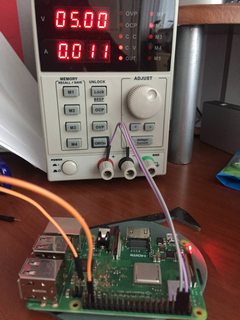
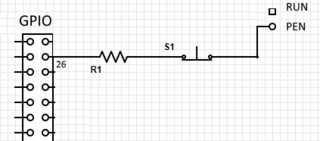
everywhere
https://www.google.c...Q4dUDCAY&uact=5
https://www.raspberr...ic.php?t=207961
interesting. a real poweroff from software
GPIO to PEN
linux halt = full poweroff
dtoverlay=gpio-poweroff,active_low=y
which will safely shutdown raspbian, then finally bring GPIO26 / PEN low to shut off power.
11mA measured
and poweron pulse button
this is the missing featue on our PI
a real poweroff and pulse to power on
now an UPS can auto poweron @ 10% battery and no more problem
and serious design
like any ATX computer
a power switch on low voltage is a bad desig
n
The power LED will probably be consuming about 4mA, the PEN pull-up about 2.5mA, the Transorb over-voltage protector, the PMIC and high-side switch for HDMI 5V should not be drawing much. So there's about 4-5mA unaccounted for.
the other solution is small solid state relay
https://fr.farnell.c...s-de-relais=cms
A good one = https://fr.farnell.c...t-no/dp/1608203
4.5A 0.1ohm
Make your own raspberry robot, control it over the internet in FPV mode with super low latency and securely share access on it to your friends with Vigibot.com! You are welcome to test our robots now!
https://www.vigibot.com(100% free, no ads)
#134
Mike118
-
- Administrateur
-
- 12 871 messages
Staff Robot Maker
- Gender:Male
- Location:Anglet
- Interests:Robotique, Entrepreneuriat, Innovation, Programmation, Résolution de problème, Recherche de solutions, Mécanique, Electronique, Créer, Concevoir
Posté 17 mai 2020 - 11:29
So this is what I am studying to use to solve the problem : https://www.pololu.com/product/2808
Si mon commentaire vous a plus laissez nous un avis !
Nouveau sur Robot Maker ?
Jetez un oeil aux blogs, aux tutoriels, aux ouvrages, au robotscope aux articles, à la boutique et aux différents services disponible !
En attendant qu'une bibliothèque de fichiers 3D soit mise en place n'hésitez pas à demander si vous avez besoin du fichier 3D d'un des produits de la boutique... On l'a peut être !
Si vous souhaitez un robot pilotable par internet n'hésitez pas à visiter www.vigibot.com et à lire le sous forum dédié à vigibot!
#135
firened
-
- Membres
-
- 2 124 messages
Pilier du forum
- Gender:Male
Posté 17 mai 2020 - 15:05
-i just remembered the low voltage alarm pin on the CW2015, maybe it can be connected to a switch and FET to solve both requirements!
-the pololu pushbutton switch looks like a possibility too. CTRL pin probably wants clear signals, so maybe also the alarm pin from the CW2015?
from the pololu pushbutton spec:
"Switch can lose its state when power is disconnected (the switch typically defaults to being off when power is first applied, but it can default to being on near the upper end of the operating range)"
would that be a problem or how many days will the battery last after the pololu switch turned off?
-the pololu pushbutton switch looks like a possibility too. CTRL pin probably wants clear signals, so maybe also the alarm pin from the CW2015?
from the pololu pushbutton spec:
"Switch can lose its state when power is disconnected (the switch typically defaults to being off when power is first applied, but it can default to being on near the upper end of the operating range)"
would that be a problem or how many days will the battery last after the pololu switch turned off?
#136
Mike118
-
- Administrateur
-
- 12 871 messages
Staff Robot Maker
- Gender:Male
- Location:Anglet
- Interests:Robotique, Entrepreneuriat, Innovation, Programmation, Résolution de problème, Recherche de solutions, Mécanique, Electronique, Créer, Concevoir
Posté 17 mai 2020 - 15:47
there is also the same product with a 2 position switch
Si mon commentaire vous a plus laissez nous un avis !
Nouveau sur Robot Maker ?
Jetez un oeil aux blogs, aux tutoriels, aux ouvrages, au robotscope aux articles, à la boutique et aux différents services disponible !
En attendant qu'une bibliothèque de fichiers 3D soit mise en place n'hésitez pas à demander si vous avez besoin du fichier 3D d'un des produits de la boutique... On l'a peut être !
Si vous souhaitez un robot pilotable par internet n'hésitez pas à visiter www.vigibot.com et à lire le sous forum dédié à vigibot!
#137
firened
-
- Membres
-
- 2 124 messages
Pilier du forum
- Gender:Male
Posté 17 mai 2020 - 16:11
ah nice
@Pascal do you have a discharged battery (at around 2.4V) that you can test with your 4 diodes?
with 4 x 0.6V diodes the voltage will get stuck at 2.6V and will never reach 3.0V to actually start charging the battery.
either way. I'm not a fan of this, i think it's dangerous and advise against using it.
this is the correct group here to discuss this i think.
@Pascal do you have a discharged battery (at around 2.4V) that you can test with your 4 diodes?
with 4 x 0.6V diodes the voltage will get stuck at 2.6V and will never reach 3.0V to actually start charging the battery.
either way. I'm not a fan of this, i think it's dangerous and advise against using it.
this is the correct group here to discuss this i think.
#138
Mike118
-
- Administrateur
-
- 12 871 messages
Staff Robot Maker
- Gender:Male
- Location:Anglet
- Interests:Robotique, Entrepreneuriat, Innovation, Programmation, Résolution de problème, Recherche de solutions, Mécanique, Electronique, Créer, Concevoir
Posté 17 mai 2020 - 16:56
yes best place here to discuss about how to improve the UPS 
Si mon commentaire vous a plus laissez nous un avis !
Nouveau sur Robot Maker ?
Jetez un oeil aux blogs, aux tutoriels, aux ouvrages, au robotscope aux articles, à la boutique et aux différents services disponible !
En attendant qu'une bibliothèque de fichiers 3D soit mise en place n'hésitez pas à demander si vous avez besoin du fichier 3D d'un des produits de la boutique... On l'a peut être !
Si vous souhaitez un robot pilotable par internet n'hésitez pas à visiter www.vigibot.com et à lire le sous forum dédié à vigibot!
#139
Serveurperso
-
- Membres
-
- 5 097 messages
Pilier du forum
- Gender:Male
- Location:Paris
- Interests:Systèmes/Réseaux/Dev/Hardware/RF/Optique/Lasers...
Posté 17 mai 2020 - 17:00
yes
0.75V because load
yes 4 diode is too much !!!
3 diode look perfect
but i need to measure the CC part @ the begin of charge
remember two 18650 can handle a charge up to max 10A without problem !!!
5 better
we are limited with the charger, the low voltage, and wire vdrop !!!
and current is BMS limited also !
0.75V because load
yes 4 diode is too much !!!
3 diode look perfect
but i need to measure the CC part @ the begin of charge
remember two 18650 can handle a charge up to max 10A without problem !!!
5 better
we are limited with the charger, the low voltage, and wire vdrop !!!
and current is BMS limited also !
Make your own raspberry robot, control it over the internet in FPV mode with super low latency and securely share access on it to your friends with Vigibot.com! You are welcome to test our robots now!
https://www.vigibot.com(100% free, no ads)
#140
Mike118
-
- Administrateur
-
- 12 871 messages
Staff Robot Maker
- Gender:Male
- Location:Anglet
- Interests:Robotique, Entrepreneuriat, Innovation, Programmation, Résolution de problème, Recherche de solutions, Mécanique, Electronique, Créer, Concevoir
Posté 17 mai 2020 - 17:05
if someone plug the charger without batterie connected all the power will be provided trought the diode ...
Si mon commentaire vous a plus laissez nous un avis !
Nouveau sur Robot Maker ?
Jetez un oeil aux blogs, aux tutoriels, aux ouvrages, au robotscope aux articles, à la boutique et aux différents services disponible !
En attendant qu'une bibliothèque de fichiers 3D soit mise en place n'hésitez pas à demander si vous avez besoin du fichier 3D d'un des produits de la boutique... On l'a peut être !
Si vous souhaitez un robot pilotable par internet n'hésitez pas à visiter www.vigibot.com et à lire le sous forum dédié à vigibot!
Répondre à ce sujet


0 utilisateur(s) li(sen)t ce sujet
0 members, 0 guests, 0 anonymous users

